Being a small business owner is an exciting experience, but at some point, one may feel overwhelmed by the finances. Financial management is among the most essential aspects of running a successful business, whether it involves tracking expenses and invoices or paying taxes. Here is where accounting softwares is are important.
Contemporary accounting programs assist the proprietor of a small business in automating financial operations, reducing errors, and improving cash flow control. These tools allow business owners to track their income and expenses, create financial reports, and stay tax-ready throughout the year, rather than manually managing spreadsheets or paperwork.
This guide explains the best accounting software for small businesses in 2026, including its features, advantages, and the reasons behind its popularity among business owners.
Why Small Businesses Need Accounting Softwares
Small business owners often wear multiple hats. They handle marketing, operations, customer service, and finances all at once. Managing financial records manually can lead to mistakes, missed payments, or inaccurate reports.
These issues are addressed by employing accounting softwares that makes the financial management less complicated. These tools automatically keep records of transactions, categorize expenses, and generate reports with just a few clicks.
Automation is one of the greatest benefits of current accounting programs. Rather than having to enter each entry by hand, most systems can be connected directly to bank accounts, payment gateways, and invoicing systems.
The other valuable advantage is increased financial visibility. Profit and loss statements, balance sheets, and cash flow reports are made available to business owners in real time. This will enable them to make wiser investment choices.
Also, accounting softwares enables businesses to remain compliant with taxes. Numerous systems automatically compute taxes and produce tax-ready reports, saving significant time during tax season.
When it comes to small businesses that want to expand, the accounting softwares may be a big deal.
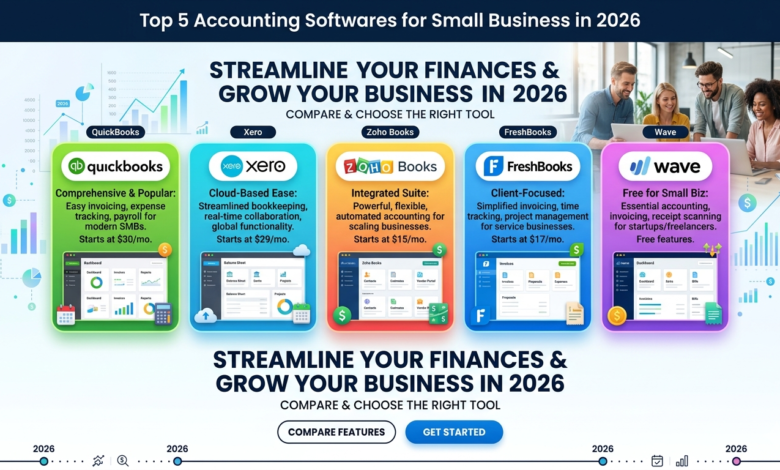
QuickBooks Online
QuickBooks Online is considered to be one of the most popular accounting software programs in the world. It is oriented to small businesses and has more powerful financial management tools.
QuickBooks Online enables business owners to manage income and expenses, generate professionally designed invoices, and track cash flow in real time. Its dashboard is also user-friendly, and anyone can easily comprehend their financial data.
Bank synchronization is one of the most helpful options of this software. It can be automatically linked with your bank accounts and import transactions. This helps save labor and also ensures that financial records are correct.
The other strength is its reporting capabilities. Companies will be able to create profit and loss statements, balance sheets and financial summaries in real time. Such insights enable the entrepreneur to understand their business’s financial performance.
QuickBooks Online also facilitates tax preparation by automatically ordering and classifying financial documents. This will greatly simplify tax filing for many small businesses.
Due to its high level of reliability, scalability, and extensive feature set, QuickBooks Online is one of the most reliable accounting softwares options for small businesses.
Xero
Xero is another excellent alternative to the contemporary accounting softwares. It has a reputable system of automation and integrations, combined with a clean interface and is known as a cloud-based accounting platform.
Xero enables small businesses to automatically control invoices, expenses, and bank reconciliation. The software supports multi-currency transactions, making it a good choice for businesses operating in a multinational environment.
The ability to collaborate is one of Xero’s strengths. The system can be used by multiple users simultaneously; thus, it is most convenient for teams that work with accountants or financial advisors.
Small business owners can also develop specific financial reports to track performance and highlight trends. These lessons can enable firms to change strategies and enhance financial stability.
The integration ecosystem is another aspect that makes Xero popular among many entrepreneurs compared to other accounting softwares. It integrates with hundreds of business applications, such as payment gateways, inventory management systems, and CRM systems.
Xero is among the best accounting softwares options for small businesses today, offering a flexible cloud-based solution.
FreshBooks
FreshBooks is among the best accounting softwares that freelancers and service-based businesses tend to seek when they need simple yet effective accounting.
FreshBooks pays much attention to invoicing and expenses, thus making it highly applicable to freelancers, consultants, and small agencies.
With FreshBooks, one can create professional invoices in a few minutes and even automate recurring invoices for frequent clients. The system also has automated payment reminders, enabling businesses to receive payments faster.
Time tracking is another important characteristic of this software. Even business organizations that bill clients per hour can track billable hours and translate them into invoices.
FreshBooks also has expense-tracking systems that enable users to capture receipts and classify expenses with ease. This makes it easy to keep track of the books and maintain accurate records.
Among several accounting softwares options on the market, FreshBooks is unique for being simple and focused on helping small businesses effectively manage client billing.
Wave Accounting
Cost may be a primary issue with startups and extremely small businesses. At this point, Wave Accounting would be a good choice.
Wave is among the few accounting software options that offer robust accounting capabilities at no cost. Although it is free, it offers the necessary features, including invoicing, expense tracking, and financial reporting.
The small business owners are able to link their bank accounts to the importation transactions and can relate it easily. This eliminates manual bookkeeping and ensures bookkeeping records are in order.
Wave also enables companies to generate and forward bills to customers. The software monitors payments and sends reminders if invoices go unpaid.
Another advantage of Wave is its easy-to-use interface. The platform enables even a user with no accounting background to learn to manage finances quickly.
Wave is a good beginner product. Though paid accounting softwares tends to be more sophisticated, it is a good choice for a small business that wants proper financial management without costing much.
Zoho Books
The last accounting software on our list of the best accounting software for small businesses is Zoho Books.
Zoho Books is a subsystem of Zoho, a larger ecosystem comprising CRM, email, and project management systems. This is particularly valuable where businesses already use other Zoho applications.
The software will have full accounting capabilities, including invoicing, expense tracking, bank reconciliation, and financial reporting. It also handles much of the repetitive accounting work, saving the business owner time.
Automation of Zoho Books is one of its strongest strengths. Businesses can develop automated processes that classify expenses, provide invoice reminders, and monitor recurring payments.
Zoho Books also facilitates tax compliance in most areas, making it easy for businesses to prepare financial records for tax filing.
Due to its flexibility and automation capabilities, Zoho Books has emerged as one of the fastest-growing accounting softwares platforms used by small businesses worldwide.
Conclusion
The foundation of any successful business is successful is the financial management. Lack of accounting can lead to confusion about liquidity, insufficient cash flow, inaccurate records, or even tax problems.
Luckily, there is financial management software available today to simplify financial management. They digitize bookkeeping and streamline invoicing, delivering useful financial information that enables businesses to make smarter decisions.
Small business owners can use such accounting softwares as QuickBooks Online, Xero, FreshBooks, Wave Accounting, and Zoho Books nowadays.
By choosing the right software, small business owners can save time, reduce financial stress, and focus on what truly matters, growing their business.
FAQs
What is the purpose of accounting softwares?
Accounting softwares assists organizations in handling financial processes, including billing, expense monitoring, payroll, tax preparation, and financial reporting. They automate bookkeeping systems and provide real-time information on business finances.
Which accounting software is most suitable for small businesses?
Most modern accounting programs use advanced encryption and security measures to safeguard financial information. There are also cloud-based systems that offer automatic backups and allow access on many devices.
Are accounting softwares tax friendly?
Yes. Accounting softwares automatically classifies expenses, computes taxes, and creates tax-ready reports. This simplifies the process of filling out tax forms and minimizes the risk of errors.
Do we have free accounting softwares?
Indeed, there are other platforms that offer free accounting software with basic features such as invoicing, expense management, and reporting. Nonetheless, superior functions can be associated with paid plans.




One Comment